
What's The Deal With HIPAA Work From Home Requirements?
“What are the HIPAA work from home requirements?” That’s a complicated question to answer. Nevertheless, I’m going to cover what HIPAA allows within its law as well as best practices within this blog post.
It’s predicted that by 2025 over 36 million Americans will be working remotely.
Given what we all experienced during the COVID-19 pandemic, that statistic might not be that shocking to you. In fact, you’re probably thinking that that statistic makes a lot of sense, maybe you’re even reading this blog post while you’re working from home.
Yet, I’d wager to bet that if you had read the same statistical conclusion during your pre-2020 life it would’ve shocked you.
Although corporate jobs started to accept a more remote style during that time, it wasn’t even close to the rate the future holds. The same source states that the amount of remote workers has increased by over 87%.
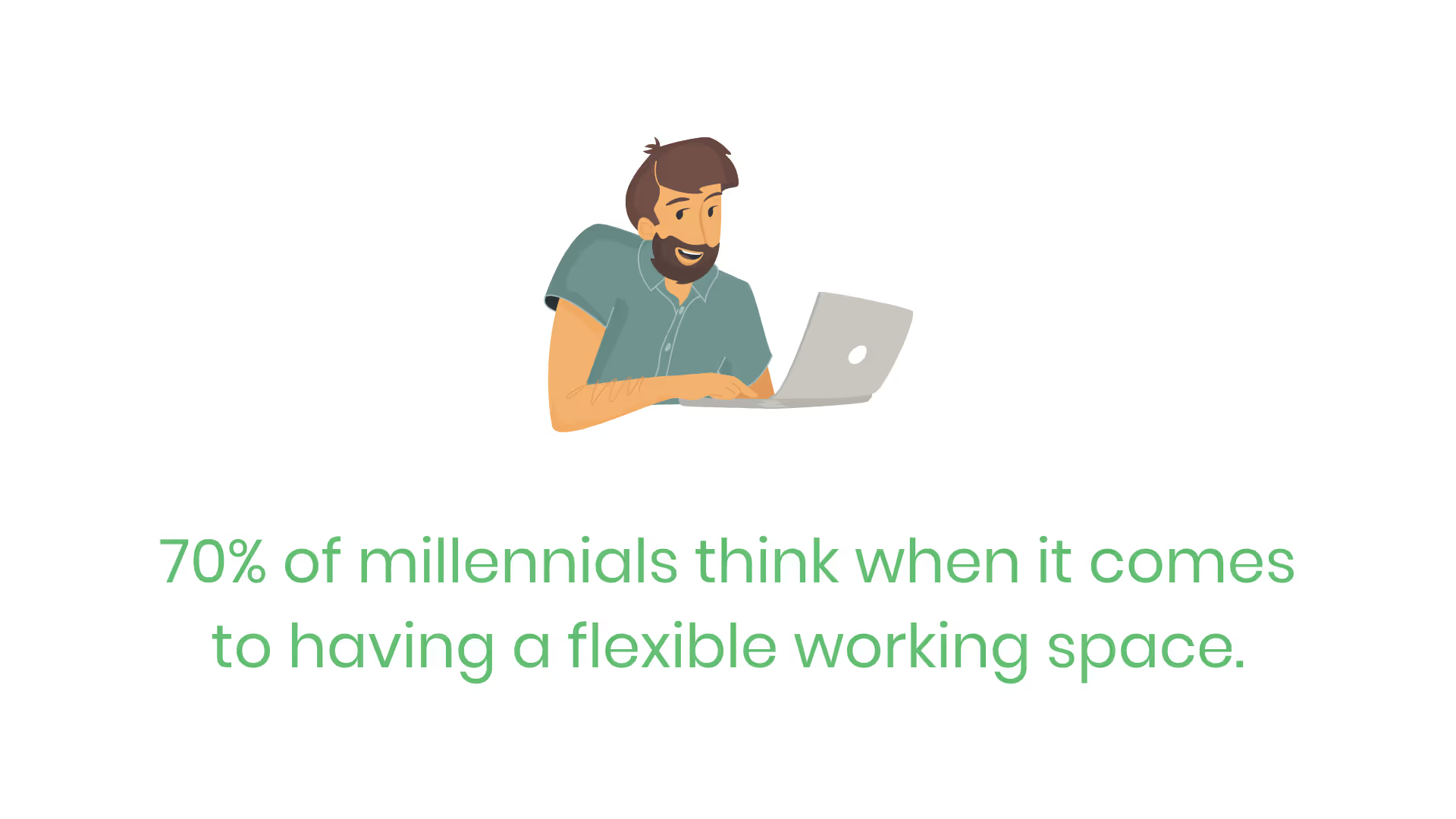
If you’re a part of the majority, you’re happy about the general heading of the corporate 9-5 lifestyle. So happy, in fact, that you may be willing to give up other benefits your job offers in place of working remotely. According to CBRE, that’s how 70% of millennials think when it comes to having a flexible working space.
Allowing employees to work from home isn’t easy for every organization though. Certain industries handle sensitive information as a part of their daily operations. This makes it much harder for the companies within them to provide such a perk to their employees.
Healthcare is one of the industries that I’m referring to.
Doctor’s offices, hospitals and even businesses that help medical professionals so that they don’t burn out on the job all work with protected health information (PHI). As a result, they need to follow the Health Insurance Portability and Accountability Act (HIPAA).
HIPAA exists to protect everyone’s most sensitive information. No one is immune to the doctor, thus we all have a file housed within our doctor’s system containing our private medical history and data.
It’s arguably one of the most necessary laws in existence today, especially when you consider what corporations used to do before it passed in 1999. But it also happens to be one of the hardest regulations to stay in compliance with as well.
I imagine that by now you’re wondering, “Can companies who need to follow HIPAA even allow remote work?”
The answer to that question is a resounding yes. If it wasn’t there wouldn’t have been such an explosion in the popularity of telehealth services recently.
Yet, maybe you already knew that you’re allowed to establish remote work. If that’s the case you’re wondering, “What are the HIPAA work from home requirements?”
That’s a much more complicated question to answer. Nevertheless, I’m going to cover what HIPAA allows within its law as well as best practices within this blog post.
The Law's Remote Requirements
At the time of writing, HIPAA doesn’t contain a section within it that explicitly states requirements for organizations to follow when it comes to remote work.
What I mean by that is that it doesn’t come flat out and say, “Before you allow your employees to log in from their home office, you must complete the following steps.”
Although that would save healthcare organizations and their business associates a lot of time, that’s not the case.
However, HIPAA’s list of requirements provided as safeguards within the Privacy and Security Rules still apply. In other words, you need to make sure that you can still follow each safeguard that’s given within the law...in a remote setting.
It’s flexible so that organizations are free to decide what processes and policies they need to put in place. Also so that they’re free to choose what vendors to partner with to help them. The pessimist would say that the law isn’t flexible, it’s ambiguous. I’ll admit I’ve written that opinion before.
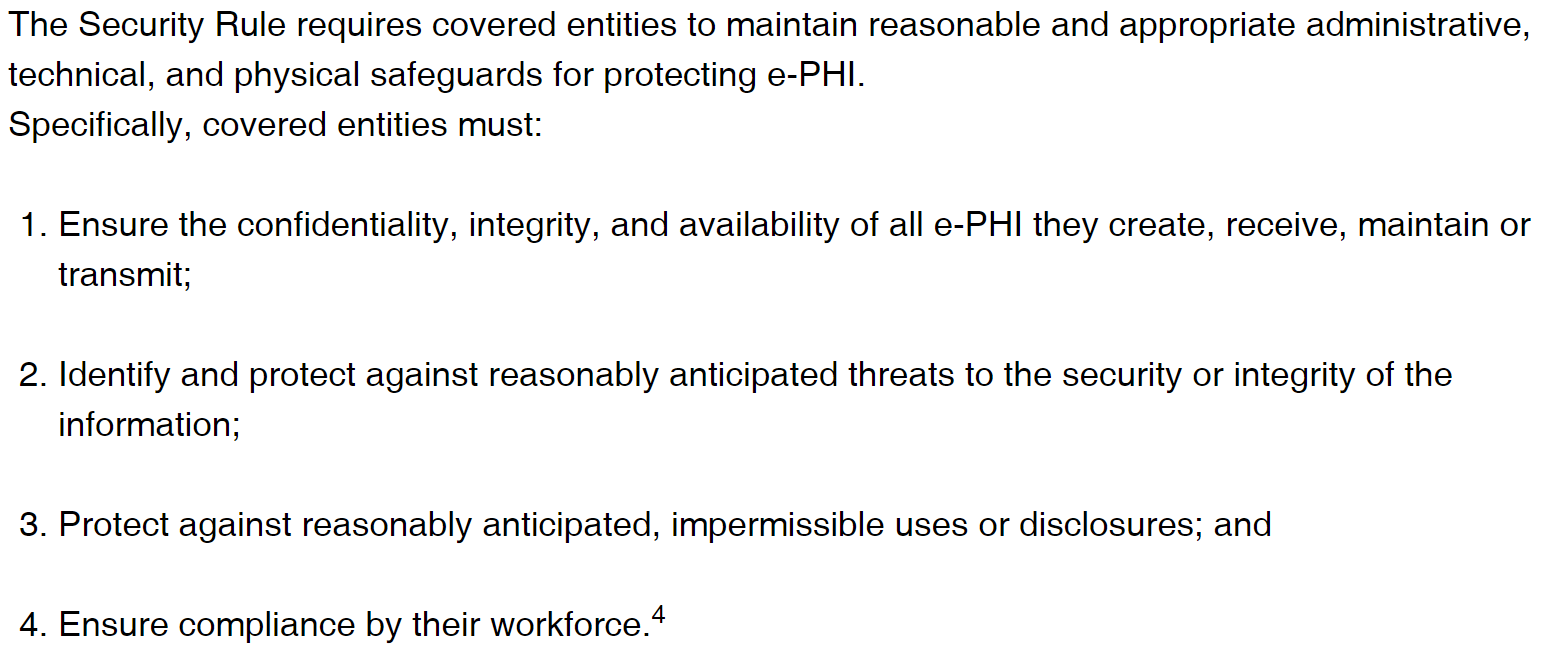
In other words, HIPAA’s work from home requirements are your responsibility to put in place. Yet you need to be able to stay in compliance with all of the safeguards, otherwise, you’ll end up with a massive fine on your hands.
Best Practices for Healthcare At-Home Workers
Since the Department of Health and Human Services keeps HIPAA’s requirements adaptable, what requirements should you impose on those of your employees who are working from home?
Well, before you allow anything you need to make sure that you put a series of policies in place. These policies are your HIPAA work from home requirements. The policies you come up with not only protect your organization in the case of an audit but also guide your remote employees to ensure they’re working in a secure environment.
After all, your employees are your biggest risk from a cybersecurity perspective. That’s a harsh statement, but they’re also one of the most common causes for HIPAA violations whether it be from gossip or unintentionally.
Now that I’ve set the stage, let’s talk about some of the most important requirements to put in place. That way, you may allow your healthcare employees to work from home.
Luckily, data already exists that points out the biggest challenges that organizations ran into when they had no choice but to allow their employees to work from home in 2020.
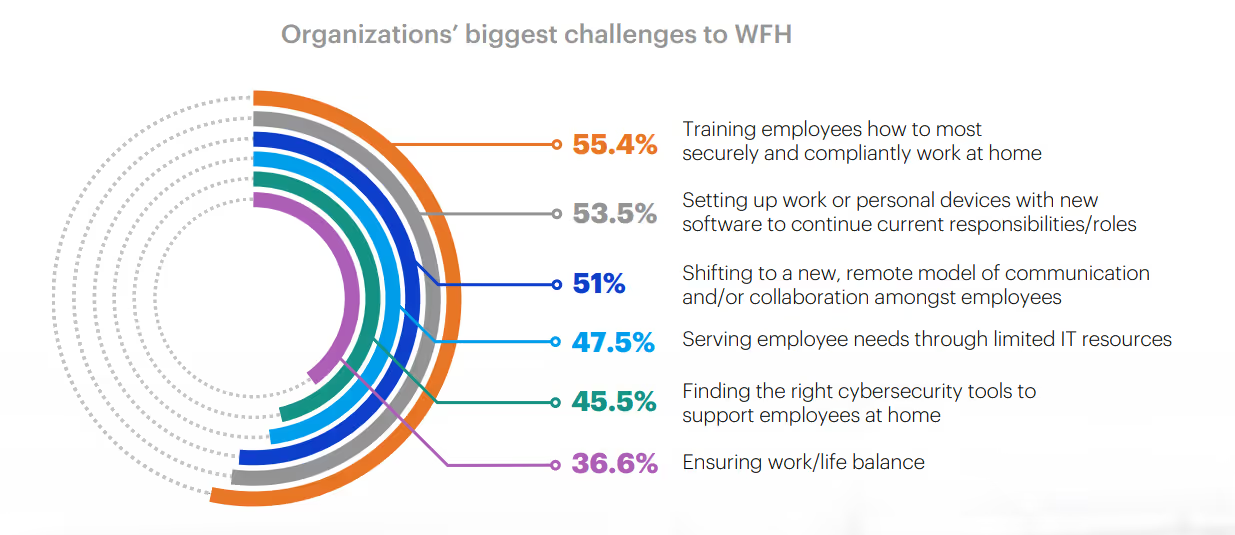
Since each of the challenge areas highlighted in the chart above come from organizations who are already allowing their teams to log in from home, you should use it as a guide. In other words, the companies surveyed in the study above are already beta-testing a perk that you’re thinking about adding, why not use that to your advantage?
That means the work from home requirements you put in place should include…
- Establishing a consistent training program for working securely and compliantly at home
- Setting up both work and personal devices with the required software to ensure a smooth transition into a new environment
- Linking employees via electronic communication methods for collaborative purposes
- Meeting IT resource needs
- Evaluating and implementing cybersecurity tools that support your remote workforce
- Encouraging and re-emphasizing the importance of a work/life balance to ensure remote workers remain productive and don’t burn themselves out
Sure, the organizations involved in the survey weren’t all serving the healthcare industry. Yet, diminishing the data because of that reason isn’t the right way of thinking.
Companies of all sizes and industries deal with confidential data. Even though PHI contains some of the most sensitive information on the planet, that doesn’t mean you can’t learn from the experiences of other organizations and apply similar requirements to your remote strategy.
HIPAA Work From Home Consequences
Of course, this blog post isn’t complete without giving you real-world examples of what has happened to healthcare organizations that failed to implement HIPAA work from home requirements.
I will warn you, the consequences for violating HIPAA with a remote workforce are severe. This is most likely attributable to the fact that it’s such a new way of working.
Cancer Care Group faced a $750,000 fine in 2015 for HIPAA violations that happened in a telecommunication setting. The breach in question took place three years prior in 2012. One of their employees lost their work-issued laptop and backup drive due to car theft.
The odds of that scenario happening are low. It seems like one of those situations where the stars aligned and the employee was an unfortunate victim. Nevertheless, the Office of Civil Rights (OCR) found that Cancer Care Group failed to mitigate such a risk by not implementing basic measures required by the HIPAA Security Rule.

HIPAA violations as the result of remote work didn’t start and stop with Cancer Care Group.
More recently, Rhode Island-based Lifespan Health System had to pay $1,040,000 for a similar incident involving a stolen laptop. On February 25, 2017, someone stole a Macbook from one of the organization’s employees.
Lifespan admitted that the stolen device may have had a cached file of the employee’s emails stored within its hard drive. In other words, the thieves had access to PHI information from over 20,000 patients that included…
- Names
- Medical record numbers
- Demographic information
- Address information
- Prescription and administered medication data
The fine is the result of a similar determination as to the previous scenario, the OCR determined that Lifespan didn’t encrypt all devices used for work purposes. The government also determined that the healthcare organization didn’t instill the right business-associate agreements.
Conclusion
HIPAA doesn’t flat-out tell you what its work from home requirements. Although that means you don’t have a how-to guide laid out for you, it’s actually advantageous.
The law exists in a flexible way so that you have more freedom to establish requirements that cater to how your organization runs. The important concept to remember is that you do still need to follow and establish processes that not only keep your business running smoothly but also stays in compliance with HIPAA.
Learn from the mistakes of other healthcare organizations who’ve already paid a hefty price for their violations and companies in other industries who’ve already allowed their workforce to log in from a remote location.
Emphasize your product's unique features or benefits to differentiate it from competitors
In nec dictum adipiscing pharetra enim etiam scelerisque dolor purus ipsum egestas cursus vulputate arcu egestas ut eu sed mollis consectetur mattis pharetra curabitur et maecenas in mattis fames consectetur ipsum quis risus mauris aliquam ornare nisl purus at ipsum nulla accumsan consectetur vestibulum suspendisse aliquam condimentum scelerisque lacinia pellentesque vestibulum condimentum turpis ligula pharetra dictum sapien facilisis sapien at sagittis et cursus congue.
- Pharetra curabitur et maecenas in mattis fames consectetur ipsum quis risus.
- Justo urna nisi auctor consequat consectetur dolor lectus blandit.
- Eget egestas volutpat lacinia vestibulum vitae mattis hendrerit.
- Ornare elit odio tellus orci bibendum dictum id sem congue enim amet diam.
Incorporate statistics or specific numbers to highlight the effectiveness or popularity of your offering
Convallis pellentesque ullamcorper sapien sed tristique fermentum proin amet quam tincidunt feugiat vitae neque quisque odio ut pellentesque ac mauris eget lectus. Pretium arcu turpis lacus sapien sit at eu sapien duis magna nunc nibh nam non ut nibh ultrices ultrices elementum egestas enim nisl sed cursus pellentesque sit dignissim enim euismod sit et convallis sed pelis viverra quam at nisl sit pharetra enim nisl nec vestibulum posuere in volutpat sed blandit neque risus.
Use time-sensitive language to encourage immediate action, such as "Limited Time Offer
Feugiat vitae neque quisque odio ut pellentesque ac mauris eget lectus. Pretium arcu turpis lacus sapien sit at eu sapien duis magna nunc nibh nam non ut nibh ultrices ultrices elementum egestas enim nisl sed cursus pellentesque sit dignissim enim euismod sit et convallis sed pelis viverra quam at nisl sit pharetra enim nisl nec vestibulum posuere in volutpat sed blandit neque risus.
- Pharetra curabitur et maecenas in mattis fames consectetur ipsum quis risus.
- Justo urna nisi auctor consequat consectetur dolor lectus blandit.
- Eget egestas volutpat lacinia vestibulum vitae mattis hendrerit.
- Ornare elit odio tellus orci bibendum dictum id sem congue enim amet diam.
Address customer pain points directly by showing how your product solves their problems
Feugiat vitae neque quisque odio ut pellentesque ac mauris eget lectus. Pretium arcu turpis lacus sapien sit at eu sapien duis magna nunc nibh nam non ut nibh ultrices ultrices elementum egestas enim nisl sed cursus pellentesque sit dignissim enim euismod sit et convallis sed pelis viverra quam at nisl sit pharetra enim nisl nec vestibulum posuere in volutpat sed blandit neque risus.
Vel etiam vel amet aenean eget in habitasse nunc duis tellus sem turpis risus aliquam ac volutpat tellus eu faucibus ullamcorper.
Tailor titles to your ideal customer segment using phrases like "Designed for Busy Professionals
Sed pretium id nibh id sit felis vitae volutpat volutpat adipiscing at sodales neque lectus mi phasellus commodo at elit suspendisse ornare faucibus lectus purus viverra in nec aliquet commodo et sed sed nisi tempor mi pellentesque arcu viverra pretium duis enim vulputate dignissim etiam ultrices vitae neque urna proin nibh diam turpis augue lacus.